
Translate WordPress and Idtheme Themes to Indonesian
For users in Indonesia, translating WordPress, plugins, and themes (including Idtheme) to Indonesian makes site management easier.
Video Tutorial (Placeholder)
Here is a video explaining language settings and how to use Loco Translate.
1. Use WordPress Language Settings
- Go to Settings → General.
- Find the Site Language option.
- Select Indonesian.
- Save changes.
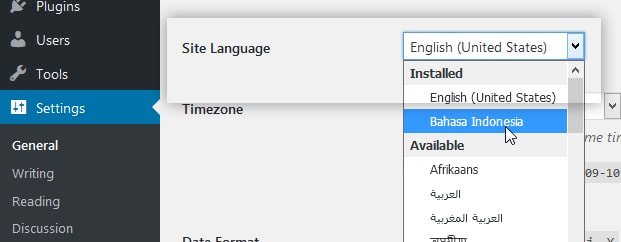
WordPress will attempt to download the Indonesian language pack for core and any supported plugins/themes.
After this step:
- Many default WordPress texts will automatically change to Indonesian.
- Idtheme themes that already provide Indonesian translation files will also switch.
2. Use the Loco Translate Plugin
A popular plugin for translating theme/plugin strings is Loco Translate.
- Go to Plugins → Add New.
- Search for
Loco Translate. - Install and activate the Loco Translate plugin.
Loco Translate plugin link: https://wordpress.org/plugins/loco-translate/
Translate Idtheme Themes
- Go to Loco Translate → Themes.
- Select the Idtheme you want to translate.
- Click New language (if none exists).
- Choose Indonesian and the translation file location (recommended:
languages/locoto keep safe during updates). - Click Start translating.
- Find the strings you want to translate and add the translations.
- Click Save.
Translate Plugins
The steps are the same, but go to Loco Translate → Plugins and select the plugin to translate.
3. Do Not Edit Core Theme/Plugin Files Directly
Recommended:
- Do not edit language files directly in core theme/plugin folders, because:
- They can be overwritten during updates.
- Always use Loco Translate and save translations in the recommended location (e.g.,
languages/locoor another safe custom directory).
This way, when an Idtheme is updated:
- Your translation files remain safe.
- You only need to sync if there are new strings.
4. Sync After Updates
After updating a theme or plugin:
- Sometimes new strings are added.
- Open it again in Loco Translate and click Sync to fetch the latest strings.
5. Translation Tips
- Use consistent terms (e.g., “Beranda” for Home, “Artikel” for Posts).
- Avoid overly long translations that might break the layout.