
Installing and Configuring DLPRO
Video Tutorial
Please watch the installation tutorial video first.
Installation Steps
- Download the Dlpro theme from the member area.
- Extract the package you downloaded.
- Upload the
dlpro.zipfile to WordPress via Appearance → Themes → Upload Theme. - Activate the DLPRO theme.
- Install and activate all required plugins. Wait a moment until completed.
License Activation
- Go to Plugins → Dlpro License.
- Enter the license key obtained from the Kentooz member area at: https://member.kentooz.com/softsale/license.
- Save to activate the license for updates and support.
Import Demo Data
- Go to Appearance → Import Demo Data.
- Click the Import Demo Data button and wait a few minutes.
- After completion, your site will look like the demo. Continue by adjusting widgets and the Customizer.
DLPRO Customizer
Go to Appearance → Customize to configure the theme’s appearance.
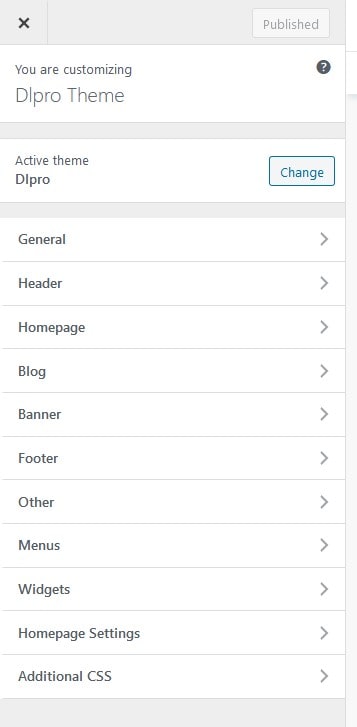
General
- General Layout: configure overall layout (boxed/fullwidth).
- General Color: set the site’s primary color.
- Background Image: set the background image.
- Typography: configure site fonts and sizes.
Header
- Site Identity: logo and other site identity settings.
- Header Image: header background image.
- Header Color: header color.
- Menu Style: menu style settings (including sticky menu).
Homepage
- Top Notification: short notification at the top of the homepage.
- Can be switched from category to text and vice versa.
Blog
- Blog Layout: sticky sidebar, site navigation, archive layout.
- Blog Content: configure blog content elements, related posts, Facebook comments, etc.
Banner
- Manage all banners available in the theme (around 10 sub‑settings available).
Footer
- Copyright text.
- Number of widgets displayed in the footer.
- Social footer and other settings.
Other
- Head/Footer Script, Analytics, Pixel, Optimization, and other settings.
Menus
- Website menu settings.
Widgets
- Module and sidebar settings.
Additional CSS
- Enter custom CSS for further customization.
Server Requirements
- Apache with PHP 7+ (supports 7.1 and 7.2). Latest version recommended.
- WordPress 5.0+ (latest version recommended).
- Curl Module and OpenSSL enabled (required).
- For security, if you use PHP below version 7, update to 7+ is recommended.