
Newkarma Menu Settings
The Newkarma theme uses WordPress’s native menu system.
Setup is similar to other Idtheme themes.
Video Tutorial
The original documentation provides a video. Watch it first to understand the setup flow.
Create the Main Menu
- Go to Appearance -> Menus.
- If you don’t have a menu yet:
- Click create a new menu.
- Name it (e.g., Main Menu).
- Click Create Menu.
- Add items to the menu:
- From the left panel (Pages, Posts, Custom Links, Categories).
- Check the items you want to include.
- Click Add to Menu.
- Arrange the menu structure using drag & drop.
- To create a submenu (dropdown), move an item slightly to the right under its parent.
Menu Locations
- Primary: main header menu.
- Secondary: secondary menu below/above the primary.
- Top Navigation: top bar navigation.
- Copyright Navigation: footer navigation to the right of the copyright.
- Scroll Mobile Menu: scrollable navigation on mobile.
Configure in Appearance > Menus > Manage Locations, assign a menu to each location, then Save Changes.
Additional Menu Item Options
Note: Simple mega menu (column menu) is supported. Configuration steps:
- First enable CSS Classes: click Screen Options at the top right to reveal the settings; see the screenshot below:

- Check the CSS Classes option. Then edit the Parent Menu (main menu; see the video above).
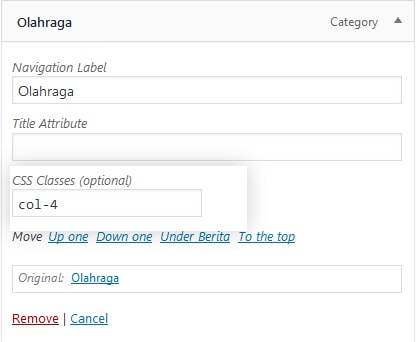
- In CSS Classes, enter:
- col-2 for a 2‑column submenu
- col-3 for a 3‑column submenu
- col-4 for a 4‑column submenu
- Done.
Note: The Newkarma theme supports up to 5 menu locations; see the tutorial video above.
Menu Structure Tips
- Solution to add icons to menus: Add Icons to Menu
- Use a simple, visitor‑friendly structure:
- Main menu includes key categories or pages (Home, Blog, Contact, etc.).
- Submenus for further grouping (e.g., news categories).
- For mobile:
- Keep dropdown levels shallow.
- Use concise, clear labels.
Notes
- Keep the menu structure simple and easy to understand.
- For mobile, use a dedicated menu to maintain usability.
- Use the footer menu for policy links, contact, or other important information.